
General bank app and ATM steps
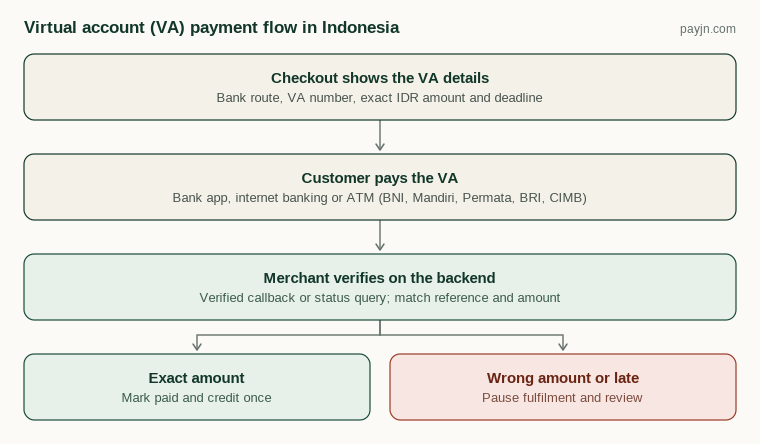
PAYJN lists BCA, BNI, Mandiri, Permata, BRI and CIMB virtual account collection routes. Which banks are enabled depends on your product type and is confirmed during review. The following steps describe general Indonesian banking practice, since menu names and screens differ by bank and payment channel.
- Choose an available bank route at checkout and copy or note the virtual account number.
- Open the banking app or internet banking, or start the payment at an ATM.
- Choose the bank's virtual account payment option using the instructions for that route.
- Enter the virtual account number and check the displayed recipient name and payment details.
- Check the IDR amount, entering it only where the flow requires it. Follow the exact-amount instruction shown at checkout.
- Confirm through the bank's normal authorization process and retain the receipt.
Do not assume an ordinary account transfer screen is the correct route. If details do not match, stop and check the original payment instructions before confirming.
What checkout should show
| Detail | Customer instruction |
|---|---|
| Bank route | Use the instructions for the selected bank |
| Virtual account number | Copy without extra spaces or characters |
| Amount | Check the exact IDR total and amount rules |
| Expiry | Pay before the displayed deadline |
| Order reference | Keep it for order tracking and support |
Display expiry in the customer's local timezone and keep it in support records. Whether a customer can pay from a different bank depends on the route; confirm this before advertising interbank payment options. See the virtual account market page for route planning.
If the order is not credited
Check the verified callback or query the original order status. Match the payment reference, received amount and currency before fulfilment; a customer receipt alone should not mark the order paid.
For an amount mismatch, follow the VA wrong-amount guide and pause automatic fulfilment. For an unresolved case, keep the bank route, order reference, amount and payment time for support. Contact PAYJN to agree the process before launch.
This help article describes PAYJN's published coverage and general integration practice. It is not the PAYJN API specification; endpoints, field names and current limits are provided in the approved integration documentation.