
Customer payment steps
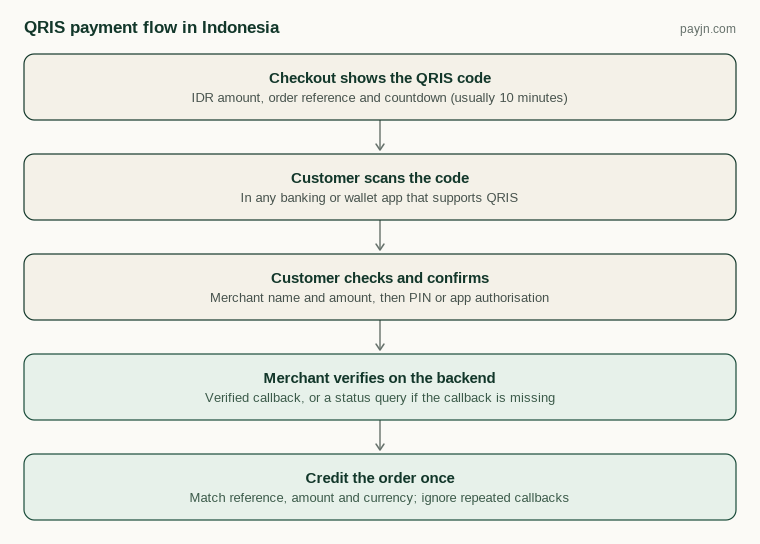
These are general payment steps. Screens and confirmation processes depend on the customer's app, so your checkout should follow the instructions for its approved route.
- Choose QRIS at checkout and check the order and IDR amount.
- Open a banking or wallet app that supports QRIS and use its scanning function to read the displayed code.
- Check the displayed recipient details and amount against the checkout. Stop if the details do not match.
- Confirm the payment using the app's normal authorization process.
- Return to the merchant's order page to check the result. Keep the receipt if support needs to investigate.
Check that customers can complete the flow on the device they use. Test realistic mobile and desktop journeys before launch rather than assuming every app presents the same options.
What the merchant should verify
- Show the order reference, exact IDR amount and expiry clearly.
- Keep the payment instructions linked to the original order.
- Show a pending state while confirmation is unresolved.
- Verify the callback using the approved integration documentation, or query the original order if the callback is missing.
- Match the reference, amount and currency before applying one credit or delivery.
A receipt or success screen can help an investigation, but neither replaces backend confirmation. Repeated notifications must not cause another credit. The QRIS and virtual account comparison explains how the customer journeys differ.
Expiry and unresolved payments
PAYJN usually sets QRIS codes to expire 10 minutes after creation, so a saved code cannot be reused for a repeat top-up. Read the expiry from each payment. Show a countdown based on that payment's expiry, and reconcile late payments by reference rather than automatically crediting an expired order.
For an unresolved payment, retain the order reference, method, amount and payment time. Use your agreed support channel; contact PAYJN when planning the exception process before launch.
This help article describes PAYJN's published coverage and general integration practice. It is not the PAYJN API specification; endpoints, field names and current limits are provided in the approved integration documentation.