
Prepare the beneficiary and payout record
| Detail | What to check |
|---|---|
| Wallet destination | The selected wallet is enabled for your merchant |
| Registered phone number or account identifier | It belongs to the intended recipient and follows the documented format |
| Account holder's name | It matches your recipient records under your agreed policy |
| Your unique payout reference | It identifies one business payout and is stored before submission |
| IDR amount | It fits the agreed merchant payout limits |
This is a general preparation checklist, not a list of PAYJN API field names. Use the exact requirements and formats in your approved integration documentation when building the request.
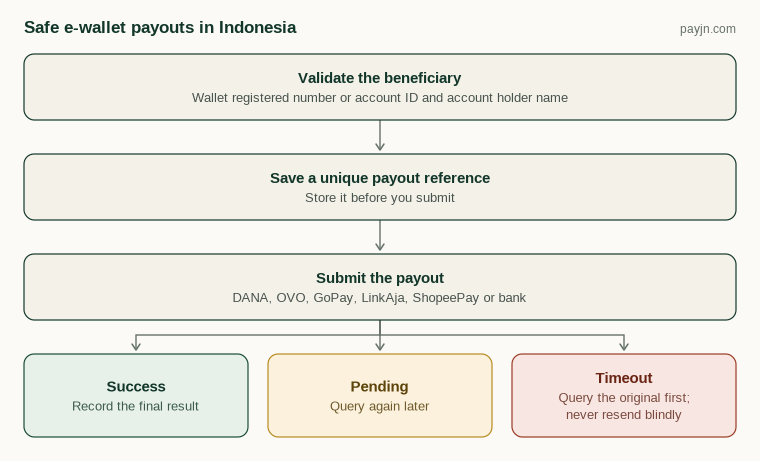
PAYJN's published payout destinations include supported Indonesian banks and DANA, OVO, GoPay, LinkAja and ShopeePay. See the Indonesia payout page for beneficiary and status planning.
Validate details before sending
- Ask the recipient to confirm the wallet identifier and account holder's name.
- Check destination data against the documented requirements. Use account validation only where the route supports it.
- Apply your policy for a name mismatch rather than silently changing the name.
- Review newly changed destination details before releasing a payout.
- Check funding and the recipient wallet's account restrictions before submitting.
A wallet can reject a credit that exceeds its balance or account limits. Payout limits are agreed per merchant; do not use published pay-in ranges as payout limits. Contact PAYJN to confirm required beneficiary information, supported destinations and the handling of rejected transfers before launch.
Keep the reference through final confirmation
An accepted request does not mean the recipient has received the money. Verify the callback and query the payout status through the documented process if the result is missing or unclear.
If a request times out, preserve the original reference and check its status before any retry. Creating a new payout without resolving the first one can pay the recipient twice. Keep the beneficiary, amount, provider reference where available and final outcome together for reconciliation.
This help article describes PAYJN's published coverage and general integration practice. It is not the PAYJN API specification; endpoints, field names and current limits are provided in the approved integration documentation.